Chord Composition
Theory Foundation: This guide focuses on composition workflow and creative techniques. For chord theory, voicings, and progressions, see Harmony.
Chord composition is the art of creating music with chords and arpeggios—not just playing them, but building them from scratch, shaping progressions, and using Strudel as a creative partner. This guide teaches you practical workflows and techniques to compose original harmonic material, from simple progressions to generative algorithms.
Part 1: Foundation - Building Blocks
Starting from Scratch - Your First Progression
The hardest part of composing is staring at a blank screen. Let’s break through that by building a progression one chord at a time.
Start with a single chord:
chord("C").voicing().s("piano")That’s your foundation. One chord, repeating. Now let’s make it interesting.
Add a second chord for contrast:
chord("<C F>").voicing().s("piano")Listen to the movement. C → F creates forward motion. The F wants to go somewhere—it has energy.
Try different second chords:
chord("<C G>").voicing().s("piano")C → G feels stronger, more decisive. Each chord choice creates a different feeling.
chord("<C Am>").voicing().s("piano")C → Am is gentle, contemplative. Same starting chord, completely different mood.
Now three chords:
chord("<C F G>").voicing().s("piano")C → F → G creates a journey: start, move away, tension. But it feels unfinished.
Complete the circle—add a fourth chord:
chord("<C F G C>").voicing().s("piano")Coming back to C creates resolution. You’ve built a complete 4-chord progression from nothing.
Try it: Change one chord in the sequence. Make the third chord Am instead of G. How does it change the feel?
chord("<C F Am G>").voicing().s("piano")The Three-Chord Foundation
Three chords are enough to write thousands of songs. Let’s explore the classic I-IV-V progression:
I-IV-V in C = C - F - G
chord("<C F G>").voicing().s("piano")These three chords work together because they represent three functions:
- I (C) = home, stable
- IV (F) = moving away
- V (G) = tension, wants to return home
Why this works (mathematical basis):
These subjective feelings have objective foundations:
- Circle of Fifths: G is 7 semitones above C (perfect 5th), F is 5 semitones below. This symmetry creates balance.
- Frequency Ratios: The perfect 5th (C→G) has a 3:2 ratio—one of the most consonant intervals. This consonance creates “pull” back to the tonic.
- Harmonic Distance: I-IV-V are equally spaced on the circle of fifths (each 1 step apart), creating harmonic coherence.
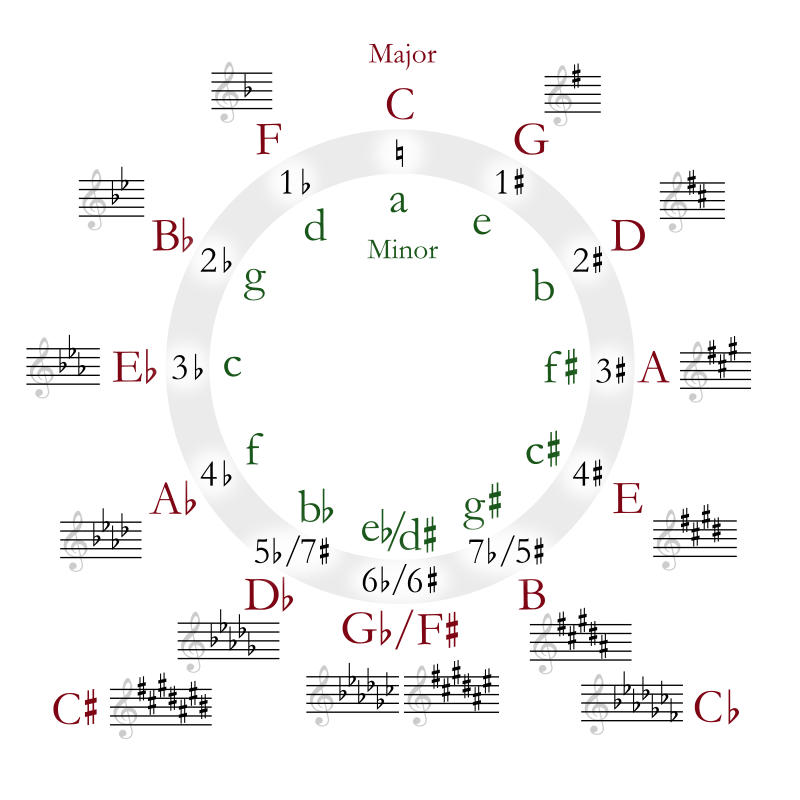
The circle of fifths shows all 12 keys arranged by perfect 5ths. Moving clockwise = up a 5th (7 semitones). C→G→D→A… Adjacent keys share the most notes, distant keys share the fewest.
Different orderings create different feels:
chord("<C G F>").voicing().s("piano")C → G → F has a different arc. The tension (G) comes earlier.
chord("<F C G>").voicing().s("piano")Starting on F (away from home) creates anticipation from the first chord.
Try it: Rearrange C, F, and G in different orders. Which feels most resolved? Which feels most tense?
Chord Notation Reference
Before we go further, let’s understand how to write any chord in Strudel. The format is: Root + Quality + Extensions + /Bass
Root Notes
Any note name with optional accidentals:
- Natural:
C,D,E,F,G,A,B - Sharp:
C#,F#,G# - Flat:
Bb,Eb,Ab
Basic Triads
| Symbol | Name | Example | Sound |
|---|---|---|---|
| (none) | Major | C | Bright, stable |
m or - | Minor | Cm, C- | Dark, sad |
o | Diminished | Co | Tense, unstable |
+ or aug | Augmented | C+, Caug | Dreamy, unresolved |
sus | Suspended 4th | Csus | Open, floating |
5 | Power chord | C5 | Neutral (no 3rd) |
chord("<C Cm Co C+ Csus C5>").voicing().s("piano").slow(1.5)Seventh Chords
| Symbol | Name | Example | Character |
|---|---|---|---|
^7 or M7 | Major 7 | C^7, CM7 | Smooth, jazzy |
7 | Dominant 7 | C7 | Bluesy, wants to resolve |
m7 or -7 | Minor 7 | Cm7, C-7 | Mellow, cool |
m7b5 or h | Half-diminished | Cm7b5, Ch | Jazz minor, tense |
o7 | Diminished 7 | Co7 | Very tense, symmetrical |
mM7 or -^7 | Minor-Major 7 | CmM7 | Mysterious, Bond theme |
chord("<C^7 C7 Cm7 Cm7b5 Co7 CmM7>").voicing().s("piano").slow(1.5)Extended Chords (9ths, 11ths, 13ths)
| Symbol | Example | Notes |
|---|---|---|
9 | C9, Cm9 | Adds major 9th |
^9 | C^9 | Major 7 + 9 |
add9 | Cadd9 | Triad + 9 (no 7th) |
11 | C11 | Adds perfect 11th |
^7#11 | C^7#11 | Lydian sound |
13 | C13 | Full jazz chord |
6 | C6, Cm6 | Adds major 6th |
69 | C69 | 6th + 9th |
chord("<C9 C^9 Cadd9 C11 C^7#11 C13>").voicing().s("piano").slow(1.5)Altered Dominants (Jazz)
These add tension to dominant 7th chords:
| Symbol | Example | Effect |
|---|---|---|
7b9 | C7b9 | Dark, tense |
7#9 | C7#9 | ”Hendrix chord” |
7b5 | C7b5 | Tritone substitution |
7#5 | C7#5 | Augmented dominant |
7alt | C7alt | All alterations |
7#11 | C7#11 | Lydian dominant |
chord("<G7 G7b9 G7#9 G7alt>").voicing().s("piano")Slash Chords (Bass Notes)
Add /note to specify a bass note different from the root:
chord("<C C/E C/G Am/E>").voicing().s("piano")C/E— C major with E in the bass (first inversion)C/G— C major with G in the bass (second inversion)Am/E— A minor with E in the bass
Quick Reference by Genre
Pop/Rock: C, Am, F, G, Dm, Em
chord("<C Am F G>").voicing().s("piano")Jazz: C^7, Dm7, G7, Cm7, F7, Bb^7
chord("<Dm7 G7 C^7 A7>").voicing().s("piano")Neo-Soul/R&B: C^9, Dm9, Em9, F^7#11
chord("<C^9 Dm9 Em9 F^7#11>").voicing().s("piano")Lo-fi/Chill: Cmaj7, Am7, Dm7, G7
chord("<C^7 Am7 Dm7 G7>").voicing().s("piano").room(0.4)Adding Rhythm to Your Chords
So far, every chord lasts one beat. Let’s add rhythmic variety with .struct():
Sparse rhythm:
chord("<C F G C>").struct("x ~ x ~").voicing().s("piano")The ~ means rest. Now chords only play on beats 1 and 3.
Syncopated rhythm:
chord("<C F G C>").struct("x ~ [x x] ~").voicing().s("piano")The [x x] plays two chords quickly on beat 3—creating a push.
Sustained chords:
chord("<C F G C>").struct("x@3 x").voicing().s("piano")The @3 makes each chord last 3 beats, with one quick change.
Try it: Create a reggae feel by putting chords on the offbeats: "~ x ~ x". How does it change the energy?
chord("<C F G C>").struct("~ x ~ x").voicing().s("piano")Adding Contrast - Creating Movement
Good chord progressions have contrast. Without it, music feels static. Let’s explore ways to create movement.
Contrast Principle #1: Major vs Minor
The simplest contrast is changing a chord from major to minor (or vice versa):
All major:
chord("<C F G C>").voicing().s("piano")Mix major and minor:
chord("<C Fm G C>").voicing().s("piano")That Fm (F minor) adds darkness, contrast. The progression has more emotional range.
Minor tonic:
chord("<Cm Fm G Cm>").voicing().s("piano")Starting with Cm (C minor) gives the whole progression a darker foundation.
Parallel movement:
chord("<C Cm F Fm>").voicing().s("piano")C → Cm (same root, different quality) creates a subtle shift. It’s the same note with a different color.
Contrast Principle #2: Root Movement
How far the bass note moves between chords affects the energy:
Step-wise movement (smooth):
chord("<C Dm Em F>").voicing().s("piano")C → D → E → F moves by steps (2 semitones each). It feels flowing, connected.
Jump movement (strong):
chord("<C F C F>").voicing().s("piano")C → F is a 4th leap (5 semitones). Strong, decisive movement.
Large leaps (dramatic):
chord("<C F# C F#>").voicing().s("piano")C → F# is a tritone (6 semitones, half the octave). Maximum harmonic distance, very dramatic.
Root movement by semitone distance:
- 0-2 semitones (stepwise): Smooth, melodic
- 3-5 semitones (leaps): Strong, purposeful
- 6 semitones (tritone): Maximum tension/distance
- 7+ semitones (5ths, octaves): Consonant, stable
Try it: Create a progression that moves in small steps, then add one big leap for emphasis. Notice how the leap stands out.
Contrast Principle #3: Static vs Moving Bass
You can keep chords changing while the bass stays still—or vice versa:
Changing chords, static bass:
chord("<C Am F G>").voicing().stack(
"c2".note().s('sawtooth').lpf(600)
).s("piano")
Chords change, but bass stays on C. Creates a pedal point effect.
Static chords, moving bass:
chord("<C>").struct("x").voicing().stack(
"c2 d2 e2 f2 e2 d2".note().s('sawtooth').lpf(600)
).s("piano")
One chord (C), but the bass line creates movement.
Building Emotional Arcs
A 4-bar phrase can tell a story: stable → moving → tension → resolution.
Example arc:
chord("<C Am Dm G>").voicing().s("piano")- Bar 1 (C): Stable, home
- Bar 2 (Am): Gentle movement
- Bar 3 (Dm): More movement, building
- Bar 4 (G): Tension, wants to resolve back to C
Why G creates tension (mathematical basis):
The G major chord (G-B-D) contains B, which is 11 semitones from C (a major 7th). This creates a strong pull:
- B → C = leading tone (1 semitone up) = strongest melodic pull in tonal music
- G → C = perfect 5th down (7 semitones) = strongest harmonic pull (dominant to tonic)
- Together, these create the classic V→I resolution that defines Western harmony
Try it: Build your own 4-chord arc. Start stable, end tense. What happens when you loop it? The tension resolves back to the first chord.
Question-answer pattern:
chord("<C G C F>").voicing().s("piano")C → G feels like a question. C → F feels like an answer. Pairing them creates conversation.
Rhythm as Composition Tool
Rhythm isn’t just decoration—it’s a compositional choice that shapes the entire feel.
Chord Rhythm Patterns
The rhythm you give chords matters as much as the notes:
On the beat (strong):
chord("<C Am F G>").struct("x ~ x ~").voicing().s("piano")Off the beat (syncopated):
chord("<C Am F G>").struct("~ x ~ x").voicing().s("piano")Same chords, totally different groove. Offbeat chords create forward drive.
Mixed on/off:
chord("<C Am F G>").struct("x ~ [~ x] ~").voicing().s("piano")The third chord anticipates beat 3—pushing forward.
Dense, busy rhythm:
chord("<C Am F G>").struct("[x x x x]").voicing().s("piano")Four hits per beat. Intense, energetic. Works for punk or rapid-fire passages.
Harmonic Rhythm: The Pace of Change
Harmonic rhythm = how fast chords change. It’s separate from chord rhythm.
Fast harmonic rhythm (chord changes every beat):
chord("C F C F G Am F G").voicing().s("piano")Constant movement. Exciting but potentially exhausting.
Slow harmonic rhythm (chord changes every 2-4 beats):
chord("<C@4 F@4 G@4 C@4>").voicing().s("piano")Each chord lasts 4 beats. Spacious, gives time to breathe.
Accelerating harmonic rhythm:
chord("<C@4 F@2 G@1 G@1 C@4>").struct("x").voicing().s("piano")Starts slow (4 beats), speeds up (2 beats, then 1), creates momentum toward the resolution.
Try it: Build tension by accelerating the harmonic rhythm, then resolve with a long held chord.
Genre-Specific Rhythm Conventions
Different styles have characteristic chord rhythms:
Reggae (offbeats):
chord("<C F G C>").struct("~ x ~ x").voicing().s("piano")House (sustained):
chord("<C@4 Am@4 F@4 G@4>").struct("x").voicing().s("piano").lpf(800)Punk (fast, all downbeats):
chord("<C F G F>").struct("[x x x x]").voicing().s("piano").cpm(60)Ballad (sparse, letting chords ring):
chord("<C F G C>").struct("x ~ x ~ x ~ x").voicing().s("piano").cpm(20)Compositional Workflow: Rhythm First vs Chords First
There’s no one right way. Here are two approaches:
Approach A: Chords First
- Write chords:
chord("<C Am F G>") - Add rhythm:
.struct("x ~ x [~ x]") - Refine: adjust timing and rests
Approach B: Rhythm First
- Write rhythm:
.struct("x ~ [x x] ~") - Add chords:
chord("<C Am F G>").struct(...) - Match chord changes to rhythmic events
// Rhythm-first approach
chord("<C Am F G>").struct("x ~ [x x] ~").voicing().s("piano")
Try it: Start with a drum groove, then add chords that match its rhythm. Or start with flowing chords, then add drums that complement them.
stack(
chord("<C Am F G>").struct("~ x ~ x").voicing().s('piano'),
sound("bd ~ bd ~"),
sound("~ sd ~ sd")
)
Part 2: Core Techniques
Voice Leading Fundamentals
Voice leading is the art of smooth transitions between chords. Instead of chords jumping around randomly, each individual note follows a logical path. This is what separates amateur chord progressions from professional ones.
What is Voice Leading?
When you play a chord progression, each note in the chord is a “voice.” Voice leading tracks where each voice goes:
Without voice leading (jumpy):
chord("<C^7 F^7 Dm7 G7>").voicing().s("piano")With smooth voice leading:
chord("<C^7 F^7 Dm7 G7>").anchor("c5").voicing().s("piano")Hear the difference? The second one flows. Notes move by small steps instead of large jumps.
Measuring voice leading efficiency:
You can quantify smoothness by counting semitone movement:
- Efficient voice leading: Total movement < 5 semitones per chord change
- Example (C to G): C-E-G → G-B-D = C→B (1 semitone), E→D (2 semitones), G→G (0 semitones) = 3 total
- Inefficient: Total movement > 12 semitones (large jumps)
Classical composers (Bach, Chopin) often kept voice leading under 3 semitones per voice. This creates smooth, connected harmony.
Try it: Listen to each example several times. Focus on the highest note—hear how it moves smoothly in the second example?
The anchor() Function
The anchor() function controls where voicings sit in register. It keeps chords near a target note, minimizing jumps:
No anchor—voicings jump around:
chord("<C^7 Dm7 G7 C^7>").voicing().s("piano")Anchor around middle C:
chord("<C^7 Dm7 G7 C^7>").anchor("c4").voicing().s("piano")Anchor higher:
chord("<C^7 Dm7 G7 C^7>").anchor("g5").voicing().s("piano")Higher anchor = higher voicings. The anchor acts like a “center of gravity” for your chords.
Try it: Change the anchor from "c4" to "c6". Hear how all the voicings shift up?
The mode() Function
Mode controls HOW voicings align to the anchor:
Mode: “below” (default)—top note at or below anchor:
chord("<C^7 Dm7 G7>").anchor("c5").mode("below").voicing().s("piano")Mode: “above”—bottom note at or above anchor:
chord("<C^7 Dm7 G7>").anchor("c5").mode("above").voicing().s("piano")Mode: “root”—root note in bass position:
chord("<C^7 Dm7 G7>").anchor("c5").mode("root").voicing().s("piano")For most smooth voice leading, stick with “below” (the default).
Visualizing Voice Leading with Pitchwheel
The _pitchwheel() visualization displays pitches on a circular diagram, making it easy to see how notes move between chords:
chord("<C^7 Dm7 G7 C^7>").anchor("c5").voicing().s("piano")._pitchwheel()Watch how the dots on the wheel move smoothly between chords—good voice leading creates minimal movement around the circle.
Compare jumpy vs smooth voice leading:
chord("<C^7 Dm7 G7 C^7>").voicing().s("piano")._pitchwheel()Without .anchor(), notes jump around the wheel more dramatically.
Smooth Transition Techniques
Great voice leading uses these principles:
1. Common Tones—keep shared notes:
C major (C-E-G) and Am (A-C-E) share C and E. Keep those notes in the same voice:
chord("<C Am>").anchor("c5").voicing().s("piano")2. Step-wise motion—move by small intervals:
chord("<C Dm Em F>").anchor("c5").voicing().s("piano")Each chord flows into the next. No large jumps.
3. Contrary motion—voices move in opposite directions:
chord("<C G C>").layer(
x => x.anchor("c5").voicing().s('piano'),
x => x.rootNotes("<2 3 2>").note().s('sawtooth').lpf(600)
)
Top voices move down (C → G), bass moves up. Creates balance.
Practical Workflow: Voice Leading Step-by-Step
Step 1: Write chords without anchor (hear the problem):
chord("<C^7 Eb^7 Ab^7 Db^7>").voicing().s("piano")Jumpy! Distant roots make voicings leap.
Step 2: Add anchor (smooth it out):
chord("<C^7 Eb^7 Ab^7 Db^7>").anchor("c5").voicing().s("piano")Much better. Voicings stay close together.
Step 3: Fine-tune anchor height (find sweet spot):
chord("<C^7 Eb^7 Ab^7 Db^7>").anchor("g5").voicing().s("piano")Too high? Try lower. Experiment until it sounds right for your context.
Step 4: Add bass and rhythm (complete the picture):
chord("<C^7 Eb^7 Ab^7 Db^7>").layer(
x => x.anchor("c5").voicing().struct("[~ x]*2").note().s('piano'),
x => x.rootNotes(2).note().s('sawtooth').lpf(600)
)
Now you have smooth voice leading, clear bass, and rhythm. Professional sound.
Try it: Take any progression from Part 1 and add .anchor("c5"). Hear the improvement?
Building Progressions from Functional Harmony
Functional harmony is a powerful composition framework: every chord has a role (function) in the key.
The Three Functions
In any key, chords fall into three categories:
Tonic (I, vi)—home, stable, resolved:
chord("<C Am>").voicing().s("piano")These chords feel like resting points. No tension.
Subdominant (IV, ii)—moving away from home:
chord("<F Dm>").voicing().s("piano")These create gentle motion, anticipation.
Dominant (V, V7)—tension, wants to resolve to tonic:
chord("<G7>").voicing().s("piano")Strong pull back to C. The 7th adds urgency.
All three together:
chord("<C F G7 C>").voicing().s("piano")Tonic → Subdominant → Dominant → Tonic. Complete journey.
Function-First Composition
Instead of choosing chords randomly, think about function FIRST, then pick specific chords.
Step 1: Plan the functional progression:
“I want: stable → move away → tension → home”
That’s: Tonic → Subdominant → Dominant → Tonic
Step 2: Choose chords for each function:
- Tonic: C (I)
- Subdominant: Dm (ii)
- Dominant: G7 (V7)
- Tonic: C (I)
Step 3: Play it:
chord("<C Dm G7 C>").voicing().s("piano")Works! Now try different chords for the same functions:
chord("<Am Dm G7 C>").voicing().s("piano")Started with vi (Am) instead of I (C). Still tonic function, different color.
Try it: Keep the function sequence (T-S-D-T), but choose different chords: Am-F-G7-C. Does it still work?
chord("<Am F G7 C>").voicing().s("piano")Common Functional Patterns
I → IV → V → I (the classic):
chord("<C F G C>").voicing().s("piano")I → vi → IV → V (substitute vi for I):
chord("<C Am F G>").voicing().s("piano")I → V/V → V → I (secondary dominant):
chord("<C D7 G7 C>").voicing().s("piano")D7 is the dominant of G (V/V). Adds extra tension before G7.
ii → V → I (the fundamental jazz progression):
chord("<Dm7 G7 C^7>").voicing().s("piano")Subdominant → Dominant → Tonic. Strong resolution.
Beyond Basics: Modal Mixture and Substitutions
Deceptive cadence (V → vi instead of V → I):
chord("<C F G Am>").voicing().s("piano")You expect C after G, but get Am. Surprise! Yet it still works (vi is a tonic substitute).
Borrowed chord from parallel minor:
chord("<C Ab G C>").voicing().s("piano")Ab doesn’t belong in C major—it’s from C minor. Adds darkness, drama.
Tritone substitution (Db7 for G7):
chord("<C Dm7 Db7 C>").voicing().s("piano")Db7 substitutes for G7 (both want to resolve to C). Jazzy sound.
Try it: Take a I-IV-V-I progression and replace the V with its tritone sub (Db7 in C). Hear the color change?
Chromatic Movement & Passing Chords
Passing chords connect main chords smoothly. They fill gaps, making progressions flow like a melody.
What Are Passing Chords?
A passing chord sits BETWEEN two main chords:
Without passing chord (gap):
chord("<C Dm7>").voicing().s("piano")C to Dm7 is fine, but there’s space.
With passing chord (#Cdim):
chord("<C [#Cdim Dm7]>").voicing().s("piano")#Cdim sits between C and Dm7 chromatically. Smoother.
Another gap:
chord("<C Em>").voicing().s("piano")Fill with Dm:
chord("<C [Dm Em]>").voicing().s("piano")Stepwise progression: C → Dm → Em. Flowing.
Types of Passing Chords
Diminished passing chords:
chord("<C [#Cdim Dm] [#Ddim Em] [Edim F]>").voicing().s("piano")Diminished chords sit chromatically between targets. Classic technique.
Chromatic secondary dominants:
chord("<C [E7 Am] [A7 Dm] [D7 G]>").voicing().s("piano")Each seventh chord leads to the next chord (E7 → Am, A7 → Dm, D7 → G).
Approach chords (half-step below):
chord("<C [Db7 C]>").voicing().s("piano")Db7 is a half-step below C. Creates anticipation.
Bass Line Thinking
Think of your progression as a BASS LINE with chords on top:
Stepwise bass:
chord("<C Dm Em F>").layer(
x => x.voicing().s('piano'),
x => x.rootNotes(2).note().s('sawtooth').lpf(600)
)
Bass: C → D → E → F. A scale!
Walking bass (quarter notes):
chord("<C>").struct("x").voicing().stack(
"c2 d2 e2 f2".note().s('sawtooth').lpf(600)
)
Sustained C chord, walking bass underneath.
Chromatic bass line:
chord("<C>").struct("x").voicing().stack(
"c2 c#2 d2 d#2 e2".note().s('sawtooth').lpf(600)
)
Half-step motion. Works even over one chord.
Workflow: Fill the Gaps
Step 1: Write skeletal progression (main chords only):
chord("<C@2 F@2 Dm@2 G@2>").voicing().s("piano")Step 2: Identify gaps (root jumps):
C → F (jump), F → Dm (jump), Dm → G (jump)
Step 3: Fill gaps with passing chords:
chord("<C [E7 F] [Bdim Dm] [G]>").voicing().s("piano")E7 leads to F, Bdim passes to Dm. Smoother!
Try it: Take the progression C-Am-F-G. Add a passing chord between Am and F. What works?
chord("<C Am [D7 F] G>").voicing().s("piano")Extended Chords in Composition
Extended chords (9ths, 11ths, 13ths) add color and sophistication. But when should you use them?
The Extension Decision Framework
Context 1: Genre
- Ballad/Jazz: Extensions welcome →
C^9instead ofC^7 - Punk/Rock: Keep it simple →
CorC5 - R&B/Neo-soul: Extensions essential →
Cm9,Dm11
chord("<C^9 Am9 Dm9 G9>").voicing().s("piano")Context 2: Texture
- Sparse arrangement: Add extensions (fill space)
- Dense arrangement: Simple chords (avoid mud)
Context 3: Emotional goal
- More tension: Add alterations (
G7b9,G7#9) - More color: Add 9ths, 13ths
- More simplicity: Stick to triads
Practical Extension Guide
Safe extensions (work almost everywhere):
9ths on minor chords:
chord("<Dm9 Cm9 Am9>").voicing().s("piano")Beautiful, lush. Hard to go wrong.
9ths on major 7th chords:
chord("<C^9 F^9 G^9>").voicing().s("piano")Dreamy, sophisticated.
Careful extensions (use with awareness):
11ths on major chords (avoid!):
note("<c e g f4>").s("piano")The 11th (F) clashes with the 3rd (E) in major chords. Sounds muddy (C-E-G-F voicing).
11ths on minor chords (good!):
chord("<Dm11>").voicing().s("piano")Works beautifully in minor.
Advanced extensions:
13ths:
chord("<C13 F13 G13>").voicing().s("piano")Rich, complex. For sophisticated contexts.
Visualize extension density with pitchwheel:
chord("<C C^7 C^9 C13>").voicing().s("piano")._pitchwheel()Watch the pitchwheel fill up as you add extensions—triads have 3 dots, 13th chords have 6+. This helps you understand how dense each chord voicing is.
Alterations (b9, #9, #11):
chord("<G7alt>").voicing().s("piano")Maximum tension. Use before resolution.
Building Tension Progressively
Start simple, add extensions gradually:
Level 1: Triads
chord("<C F G C>").voicing().s("piano")Level 2: Add 7ths
chord("<C^7 F^7 G7 C^7>").voicing().s("piano")More sophisticated.
Level 3: Add 9ths
chord("<C^9 F^9 G9 C^9>").voicing().s("piano")Lush, colorful.
Level 4: Add alterations for max tension
chord("<C^9 F^9 G7alt C^9>").voicing().s("piano")G7alt adds edge before final resolution.
When to Stop?
More extensions ≠ better. Ask: “Does this extension ADD to the music, or just make it busier?”
Test: Simpler vs more complex
chord("<Dm7 G7 C^7>").voicing().s("piano")chord("<Dm11 G13b9 C^9#11>").voicing().s("piano")Both valid. Context determines which is better.
Try it: Take a simple I-IV-V-I progression. Gradually add extensions until it sounds WORSE. Where’s the sweet spot?
Part 3: Advanced Techniques
Reharmonization Basics
Reharmonization means changing the chords under an existing melody or bass line. It’s how you make familiar progressions fresh.
What is Reharmonization?
Take a simple progression and transform it:
Original:
chord("<C Am F G>").voicing().s("piano")Reharmonized:
chord("<C^7 A7 Dm7 G7>").voicing().s("piano")Same root movement, jazzier chords. More sophisticated.
More elaborate reharmonization:
chord("<C^7 [E7 A7] Dm7 [Db7 G7]>").voicing().s("piano")Added secondary dominants. Now it’s bebop!
Basic Substitutions
Relative substitution (I ↔ vi, IV ↔ ii):
chord("<C F Am G>").voicing().s("piano")F becomes Am—both subdominant function, different color.
Tritone substitution (swap dominants):
chord("<C Dm7 Db7 C>").voicing().s("piano")Db7 replaces G7. Both resolve to C, but Db7 descends chromatically (Db → C).
Diminished substitution:
chord("<C Ddim C>").voicing().s("piano")Ddim creates passing motion between two C chords.
Workflow: Reharm Step-by-Step
Step 1: Start with the original:
chord("<C G Am F>").voicing().s("piano")Step 2: Identify which chords to change (one at a time!):
Let’s change G to G7 (add tension):
chord("<C G7 Am F>").voicing().s("piano")Step 3: Add a secondary dominant before Am:
chord("<C [D7 G7] Am F>").voicing().s("piano")Step 4: Substitute F with Fm (borrowed from parallel minor):
chord("<C [D7 G7] Am Fm>").voicing().s("piano")Four steps, completely transformed. Still recognizable, much richer.
Common Reharmonization Patterns
Adding ii-V’s:
chord("<C [Dm7 G7] C>").voicing().s("piano")Instead of C → C, insert Dm7-G7 for movement.
Backdoor progression (bVII7 → I):
chord("<C Bb7 C>").voicing().s("piano")Bb7 (bVII) resolves to C. Smooth, unexpected.
Coltrane changes (thirds cycle):
chord("<C^7 Eb^7 Gb^7 A^7>").voicing().s("piano")Each chord is a major third apart. Creates continuous motion.
Try it: Take I-IV-V-I and add a ii-V before each chord. How many chords do you end up with?
Modal Interchange
Modal interchange = borrowing chords from parallel modes. It adds unexpected colors to major/minor tonality.
The Concept
In C major, you typically use: C, Dm, Em, F, G, Am, Bdim
In C minor, the chords are: Cm, Ddim, Eb, Fm, Gm, Ab, Bb
Modal interchange means using Bb in C major or F in C minor—borrowing from the parallel mode.
C major, all diatonic:
chord("<C Dm Em F>").voicing().s("piano")C major, with bVII borrowed from C minor:
chord("<C Dm Em Bb>").voicing().s("piano")That Bb doesn’t belong in C major—but it works! Sounds bluesy, earthy.
Common Borrowed Chords
bVII (Bb in C major):
chord("<C Bb C>").voicing().s("piano")The most popular borrowed chord. Mixolydian flavor.
iv (Fm in C major):
chord("<C Fm C>").voicing().s("piano")Adds melancholy. The minor IV is emotionally powerful.
bVI (Ab in C major):
chord("<C Ab Bb C>").voicing().s("piano")Ab-Bb-C ascends to tonic. Dramatic, epic.
bIII (Eb in C major):
chord("<C Eb F C>").voicing().s("piano")Dark, ominous. Common in metal and cinematic music.
Composition Usage
The “surprise” chord:
chord("<C F G Fm>").voicing().s("piano")After G (major), Fm (borrowed minor iv) surprises. Emotional twist.
Dark moment in major key:
chord("<C Am Fm G>").voicing().s("piano")Fm darkens the progression midway through.
Bright moment in minor key:
chord("<Cm Fm Bb Eb>").voicing().s("piano")All minor key chords, but Bb and Eb add brightness.
Try it: Start with a major key progression (all major/minor diatonic chords). Add ONE borrowed chord. Where does it have the most impact?
Creating Tension and Release
Tension and release is the heartbeat of music. Without it, progressions feel flat.
The Tension Toolkit
1. Harmonic tension (dissonant chords):
chord("<C G7alt C>").voicing().s("piano")G7alt (altered dominant) is maximally tense before C.
2. Voice leading tension (large intervals):
chord("<C Gb C>").voicing().s("piano")Tritone leap (C → Gb) creates tension even with simple triads.
3. Rhythmic tension (syncopation, anticipation):
chord("<C F G C>").struct("x ~ [~ x] x").voicing().s("piano")The third chord anticipates beat 3—rhythmic push.
4. Durational tension (delaying resolution):
chord("<C F G@3 C>").voicing().s("piano")G lasts 3 beats—extended tension before final C.
Tension Curves
Build tension over time, then release:
8-bar tension curve:
chord("<C@2 Dm@2 Em@2 F@2 G@2 G7@2 C@2 C@2>").voicing().s("piano").cpm(20)Bars 1-2: Low (C, Dm) Bars 3-4: Medium (Em, F) Bars 5-6: High (G, G7) Bars 7-8: Release (C)
Accelerating tension:
chord("<C@4 F@2 G@1 G7@1 C@4>").voicing().s("piano").cpm(20)Harmonic rhythm accelerates toward resolution, then releases.
Advanced Tension Techniques
Suspensions (delay chord tones):
chord("<Csus C>").voicing().s("piano")Csus suspends the 3rd (E → F). Resolves when F moves to E.
Pedal points (static bass, changing chords):
chord("<C Dm Em F>").voicing().stack(
"c2".note().s('sawtooth').lpf(600)
)
Chords change, bass stays on C. Creates floating tension.
Upper structures (add complexity on top):
chord("<G7#9#5>").voicing().s("piano")Altered 9th and 5th stack tension before resolution.
Cluster voicings (tight intervals):
note("[c4 d4 e4 f4]").s('piano')Four notes a step apart. Maximum dissonance.
Non-Functional Harmony & Modal Composition
Not all music follows functional harmony (Tonic-Subdominant-Dominant). Sometimes chords exist for COLOR, not function.
Breaking Free from Function
Functional progression:
chord("<C F G C>").voicing().s("piano")Clear: I-IV-V-I. Functional roles.
Non-functional progression:
chord("<C Bb Ab G>").voicing().s("piano")Descending whole steps. No functional logic—just chromatic motion.
Modal vamp (stay in one mode):
chord("<Dm7 Em7 Dm7>").voicing().s("piano")Dorian mode vamp. No resolution needed.
Modal Techniques
1. Single mode vamps:
chord("<Dm Em Dm>").voicing().s("piano")Stay in D Dorian. No tonic pull, just modal color.
2. Parallel chords (all same quality):
chord("<C Bb Ab F>").voicing().s("piano")All major chords. No functional tension.
3. Pedal progressions:
chord("<C@4 F@4>").voicing().stack(
"c2".note().s('sawtooth').lpf(600)
)
Bass drone, chords drift above.
4. Quartal harmony (stacked 4ths):
note("<[c3 f3 bb3] [d3 g3 c4] [e3 a3 d4]>").s('piano')Chords built in 4ths, not 3rds. Ambiguous, spacious.
Color-Based Composition
Think: “dark → mysterious → bright” instead of “Tonic → Dominant.”
Progression by color:
chord("<Cm Eb Bb F>").voicing().s("piano")Cm = dark, Eb = earthy, Bb = warm, F = bright. A color journey.
Workflow:
- Choose emotional/color goals (not functions)
- Pick chords that embody those colors
- Experiment with order
- Let ambiguity exist—not everything needs resolution
Try it: Build a 4-chord progression where each chord represents a different mood. Don’t worry about functional roles.
Generative & Algorithmic Composition
This is where Strudel becomes your creative partner—generating musical material that you shape, select, and refine. It’s not just playback; it’s co-creation.
Strudel as Creative Partner
Instead of writing every note, let Strudel generate options:
Random note selection:
"[c d e f g a b]".segment(4).note().s('piano')Each cycle, Strudel picks 4 random notes from the pool.
Random chords:
"<C Dm Em F G Am>".choose().chord().voicing().s("piano").choose() randomly selects one chord per cycle.
Try it: Run the above example multiple times. Each playthrough is different!
Random Note Generation
.rand - random float (0-1):
rand.range(60, 72).midi().s('piano')Random MIDI notes between 60 (C4) and 72 (C5).
.irand - random integer:
n(irand(12)).scale('C minor').s('piano')Random scale degrees in C minor.
.choose - pick from list:
"c e g bb d".choose().note().s('piano')Randomly picks notes from the list.
Selecting from Generated Sets
.segment() - grab a chunk:
"[c d e f g a b c d e f g]".segment(4).note().s('piano')Grabs 4 consecutive notes from the pool.
.pick() after .segment():
"[c d e f g a b]".segment(4).slow(2).note().s('piano')Grabs 4-note segments, playing them over 2 cycles for slower exploration.
.slice() - divide and select:
"c d e f g a b c".slice(4, 8).segment(4).note().s('piano')Slice into parts, grab a segment.
Transposing and Transforming Random Material
Once generated, SHAPE it:
.transpose() - shift up/down:
"[c e g]".segment(2).transpose("<0 3 7 5>").note().s('piano')Generates notes, then transposes them by different amounts.
.scale() - constrain to scale:
n(irand(8)).scale('D dorian').slow(2).s('piano')Random numbers → scale degrees in D Dorian, played over 2 cycles.
.add() - add interval:
"<c e g>".add("<0 7 12>").note().s('piano')Pick a note from the sequence, add octave/fifth/unison.
Controlled Randomness
.sometimesBy() - probabilistic application:
"c d e f g".note().s('piano').sometimesBy(0.5, x => x.transpose(12))50% chance each note jumps up an octave.
.degradeBy() - randomly remove events:
"c d e f g a b c".note().s('piano').degradeBy(0.5)50% of notes randomly drop out.
.jux() - stereo variation:
"c e g".note().s('piano').jux(x => x.transpose(7))Original in one channel, transposed version in the other.
Algorithmic Constraints
Perlin noise (smooth randomness):
perlin.range(60, 72).midi().s('piano')Smoother than pure randomness—creates flowing melodies.
Weighted choices:
"<c!3 e!2 g!1>".choose().note().s('piano')C appears 3x more likely than G. Control probabilities.
Workflow: Generate → Select → Shape → Refine
Step 1: Generate raw material:
"[c d e f g a b c d e f g]".segment(8).note().s('piano')Step 2: Select interesting bits:
"[c d e f g a b c d e f g]".segment(4).note().s('piano')Narrowed to 4 notes.
Step 3: Shape with transposition:
"[c d e f g a b c d e f g]".segment(4).transpose("<0 5 7>").note().s('piano')Step 4: Refine rhythm and articulation:
"[c d e f g a b c d e f g]".segment(4).transpose("<0 5 7>").struct("[x ~ x x]").note().s('piano')Step 5: Iterate—run it many times, keep what works!
Using Generative Techniques for Chord Progressions
Random walk through chords:
"<C Dm Em F G Am>".choose().chord().voicing().s("piano")Every cycle = new progression.
Weighted chord choices (stay near tonic):
"<C!3 F!2 G!2 Dm!1 Am!1>".choose().chord().voicing().s("piano")C appears most often—maintains tonal center.
Probabilistic reharmonization:
chord("<C F G C>").sometimesBy(0.3, x => x.add(7)).voicing().s("piano")30% chance each chord becomes a 7th chord.
Combining Human Composition with Algorithmic Variation
You compose the structure, Strudel adds variation:
Human: progression structure
chord("<C Am F G>").voicing().s("piano")Strudel: add random arpeggiation
chord("<C Am F G>").voicing().arp(irand(4)).note().s('piano')Random arpeggio patterns each cycle.
Human: harmonic rhythm Strudel: randomize which chords play
chord("<C Am F G>").struct("x ~ x ~").degradeBy(0.3).voicing().s("piano")Some chords randomly drop out.
The best compositions blend intention (human) with surprise (algorithm).
Part 4: Arpeggio Composition
Arpeggio Patterns as Composition
Arpeggios aren’t just broken chords—they’re a compositional tool for creating melodies, texture, and movement.
From Chords to Melody
Every chord contains a melody waiting to emerge:
Chord (all notes at once):
chord("C^7").voicing().s("piano")Arpeggio (notes in sequence):
n("0 1 2 3").chord("C^7").voicing().note().s('piano')Same notes, completely different feel. The arpeggio creates forward motion.
Pattern Library
Different patterns create different feels:
Ascending (upward energy):
n("0 1 2 3").chord("<C^7 Dm7 G7 C^7>").voicing().note().s('piano')Descending (resolving, falling):
n("3 2 1 0").chord("<C^7 Dm7 G7 C^7>").voicing().note().s('piano')Up-down (wave motion):
n("0 2 1 3 2 0").chord("<C^7 Am7>").voicing().note().s('piano')Skip pattern (leaping, energetic):
n("0 2 0 3").chord("<C^7 F^7>").voicing().note().s('piano')Alberti bass (classical accompaniment):
n("0 2 1 2").chord("<C F G C>").voicing().note().s('piano')Visualize arpeggio patterns with pitchwheel:
n("0 1 2 3 2 1").chord("<C^7 Am7>").voicing().note().s('piano')._pitchwheel()The pitchwheel shows each arpeggio note lighting up in sequence around the circle—you can see the pattern traversing the chord tones.
Contour and Shape
The SHAPE of your arpeggio pattern creates musical meaning:
Arch contour (up then down):
n("0 1 2 3 2 1 0").chord("C^7").voicing().note().s('piano')Creates a complete gesture—rise and fall.
Wave contour (undulating):
n("0 2 1 3 2 4 3").chord("<C^7 F^7>").voicing().note().s('piano')Continuous motion, no resolution.
Stepwise (smooth, flowing):
n("0 1 2 1 2 3 2").chord("C^7").voicing().note().s('piano')Leaping (dramatic, angular):
n("0 3 0 2").chord("C^7").voicing().note().s('piano')Try it: Create a pattern that goes up gradually, then jumps down dramatically. What feeling does it create?
Workflow: Pattern Development
Step 1: Start with a simple progression:
chord("<C Am F G>").voicing().s("piano")Step 2: Add a basic arpeggio pattern:
n("0 1 2 1").chord("<C Am F G>").voicing().note().s('piano')Step 3: Vary the pattern for each chord:
n("<[0 1 2 1] [3 2 1 0] [0 2 1 3] [2 1 0 1]>").chord("<C Am F G>").voicing().note().s('piano')Each chord gets its own pattern—more interesting!
Step 4: Add rhythmic displacement:
n("<[0 1 2 1] [3 2 1 0] [0 2 1 3] [2 1 0 1]>").chord("<C Am F G>").voicing().struct("[x x ~ x]").note().s('piano')Combining Arpeggios and Melodies
Arpeggios work beautifully in layers—bass, chords, and melodic lines.
The Layering Principle
Layer 1: Bass foundation:
chord("<C Am F G>").rootNotes(2).note().s('sawtooth').lpf(600)Layer 2: Add sparse chords:
chord("<C Am F G>").layer(
x => x.rootNotes(2).note().s('sawtooth').lpf(600),
x => x.struct("~ x ~ x").voicing().s('piano')
)
Layer 3: Add arpeggio on top:
chord("<C Am F G>").layer(
x => x.rootNotes(2).note().s('sawtooth').lpf(600),
x => x.struct("~ x ~ x").voicing().s('piano'),
x => x.voicing().arp("0 2 1 3").note().s('piano')
)
Three layers, clear hierarchy.
Melodic Lines Over Chords
Chord tones (notes in the chord):
chord("<C Am F G>").layer(
x => x.voicing().s('piano'),
x => "c5 e5 f5 g5".note().s('piano')
)
Melody uses only chord tones—very consonant.
Passing tones (non-chord tones):
chord("<C Am F G>").layer(
x => x.voicing().s('piano'),
x => "c5 d5 e5 f5 e5 f5 g5 a5".note().s('piano')
)
D and A aren’t in the chords—they pass through, adding motion.
Target tones (land on strong beats):
chord("<C Am F G>").layer(
x => x.struct("x").voicing().s('piano'),
x => "c5 d5 e5 e5 f5 e5 d5 g5".note().s('piano')
)
First note of each bar lands on a chord tone.
Texture Management
Know when to add, when to subtract:
Sparse (bass + arpeggio):
chord("<C Am F G>").layer(
x => x.rootNotes(2).note().s('sawtooth').lpf(600),
x => n("0 1 2 1").chord(x).voicing().note().s('piano')
)
Space to breathe.
Medium (bass + light chords + arpeggio):
chord("<C Am F G>").layer(
x => x.rootNotes(2).note().s('sawtooth').lpf(600),
x => x.struct("~ x").voicing().s('piano'),
x => n("0 1 2 1").chord(x).voicing().note().s('piano')
)
Dense (all layers):
chord("<C Am F G>").layer(
x => x.rootNotes(2).note().s('sawtooth').lpf(600),
x => x.struct("x ~ x ~").voicing().s('piano'),
x => n("0 1 2 1").chord(x).voicing().note().s('piano'),
x => "c5 d5 e5 f5".note().s('piano')
)
Full arrangement. Use for climaxes.
Try it: Start sparse, build to dense, then strip back. Create dynamic arc.
Complete Composition Workflow
Let’s build a complete piece from scratch using everything we’ve learned.
The 5-Stage Process
Stage 1: Inspiration (2-4 chord sketch):
chord("<Dm G C F>").voicing().s("piano")Simple idea. Feels jazzy, contemplative.
Stage 2: Expansion (add sections, create contrast):
chord("<Dm G C F Dm G C@2>").voicing().s("piano")Extended to 8 bars, final C held for resolution.
Stage 3: Refinement (voice leading):
chord("<Dm7 G7 C^7 F^7 Dm7 G7 C^7@2>").anchor("c5").voicing().s("piano")Added 7ths, smooth voice leading.
Stage 4: Arrangement (bass, rhythm, arpeggios):
chord("<Dm7 G7 C^7 F^7 Dm7 G7 C^7@2>").layer(
x => x.anchor("c5").voicing().struct("[~ x]*2").note().s('piano'),
x => x.rootNotes(2).note().s('sawtooth').lpf(600),
x => n("0 1 2 1").chord(x).voicing().note().s('piano')
)
Full texture.
Stage 5: Polish (tempo, effects, final tweaks):
chord("<Dm7 G7 C^7 F^7 Dm7 G7 C^7@2>").layer(
x => x.anchor("c5").voicing().struct("[~ x]*2").note().s('triangle').lpf(800),
x => x.rootNotes(2).note().s('sawtooth').lpf(600),
x => n("0 1 2 1").chord(x).voicing().note().s('piano')
).cpm(25)
Added filter, reverb, set tempo. Done!
Common Challenges & Solutions
“Sounds boring”:
- Add rhythmic variation (
.struct()) - Try reharmonization (change one chord)
- Add passing chords
- Change arpeggio pattern
“Too busy”:
- Simplify: remove a layer
- Reduce harmonic rhythm (longer chords)
- Use simpler triads instead of extensions
- Add space (rests in
.struct())
“Doesn’t flow”:
- Fix voice leading (add
.anchor()) - Check bass line (is it smooth or jumpy?)
- Add passing chords between gaps
- Ensure emotional arc (tension → release)
“No impact”:
- Build tension curve (Part 3, Section 10)
- Add dynamic contrast (sparse → dense)
- Use borrowed chords for surprise
- Add dramatic pause before resolution
Practice Challenges
Challenge 1: 4-Bar Progression (Foundation)
Build a 4-chord progression using I, IV, V, and vi. Add rhythm with .struct().
Challenge 2: Add Voice Leading + Bass (Core Technique)
Take your progression from Challenge 1. Add .anchor("c5") and a bass line with .rootNotes().
Challenge 3: Reharmonize One Chord (Advanced)
Choose one chord from your progression. Replace it with a substitute (tritone sub, borrowed chord, or secondary dominant).
Challenge 4: Add Arpeggio Layer (Arpeggio Composition)
Add an arpeggio pattern using n(). Try at least 3 different patterns.
Challenge 5: Complete 8-Bar Piece (Integration)
Combine everything:
- 8-bar progression (A section: 4 bars, B section: 4 bars)
- Voice leading with
.anchor() - Bass line
- Arpeggio or melody
- At least one advanced technique (reharmonization, modal interchange, or generative element)
What You’ve Learned
You now have a complete compositional toolkit:
Foundation:
- Building progressions from scratch
- Creating contrast and movement
- Using rhythm as a compositional tool
Core Techniques:
- Voice leading for smooth transitions
- Functional harmony thinking
- Chromatic movement and passing chords
- Extended chords and when to use them
Advanced Techniques:
- Reharmonization
- Modal interchange for unexpected colors
- Tension and release
- Non-functional and modal composition
- Generative composition: using Strudel as creative partner
Arpeggio Composition:
- Patterns and contours
- Layering melodies, chords, and bass
- Complete workflow from sketch to polish
Where to Go Next
Ready to deepen your skills?
Theory Foundation:
- Harmony — Deep dive into chord theory, voicings, and notation
Apply Your Skills:
- Rock & Pop — Genre-specific composition techniques
- EDM — Electronic music production and sound design
- Jazz (in Harmony) — Study complete jazz arrangements
Expand Your Toolkit:
- Euclidean Rhythms — Advanced rhythmic composition
- Ear Training — Develop your musical ear
Keep Composing:
The best way to improve is to compose every day. Start small—a 4-bar loop. Experiment. Break rules. Let Strudel surprise you with generative ideas. Save what works, learn from what doesn’t.
Happy composing!